Read first: QT-Bot is an analysis tool, not autopilot. It tells you how strong a setup is and why — you place every trade. No signal or confidence score guarantees a profit, and digital options are high-risk.
What QT-Bot is
QT-Bot is a Quotex signal bot for live and OTC pairs. Instead of a blind "up/down" arrow, it checks a setup from many angles, blocks the weak ones, and shows the full reasoning: direction, a confidence score, the exact checks that passed or failed, a live chart and a short backtest. It works in the web app and the Android APK.
19-layer engine
Trend, higher timeframes, S/R, momentum, volatility and exhaustion — on every candle.
CORE hard-blocks
4 non-negotiable checks force WAIT when a setup isn't clean, cutting low-quality entries.
Auto Scan
Ranks 30+ pairs and surfaces the cleanest setup so you don't chase the screen.
Walk-forward backtest
Each signal carries a recent hit-rate and a conservative, break-even–aware read.
How the analysis runs
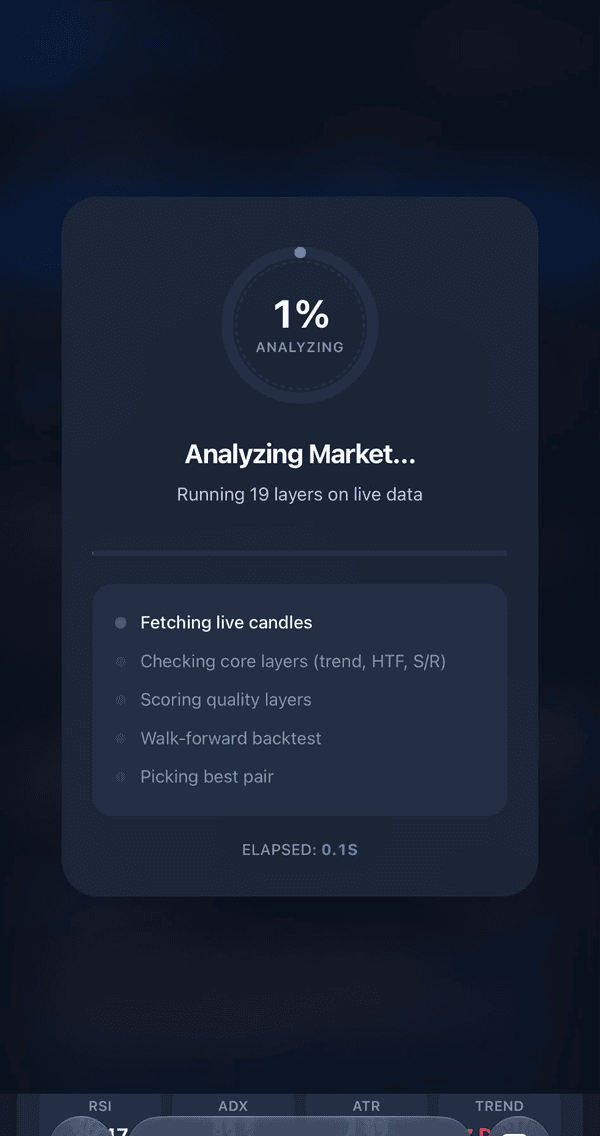
Tap Analyse Now (or let Auto Scan do it) and the engine runs a fixed pipeline on live data in about a second:
- Fetch live candles
Pulls the latest price action for the pair and timeframe (M1, M5, M10).
- Check CORE layers
Trend, higher timeframe, support/resistance room and market regime — all must pass.
- Score quality layers
ADX, MACD, RSI, Bollinger, ATR, momentum, session and more add or remove confidence.
- Walk-forward backtest
Replays recent candles to estimate a realistic hit-rate for the current conditions.
- Pick the best pair
Auto Scan ranks everything and puts the cleanest setup first.
The 19 layers explained
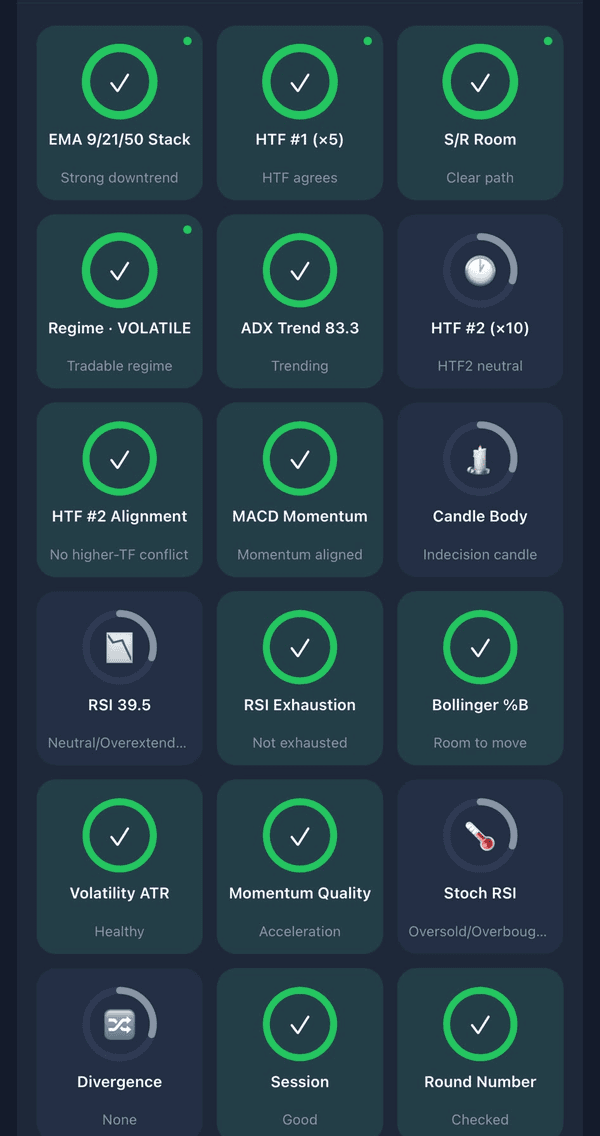
Layers come in two kinds. CORE layers are hard blocks — if any one fails, the bot returns WAIT no matter how good everything else looks (they’re marked with an accent dot in the app). The rest are scoring layers that raise or lower the confidence number.
Are the moving averages stacked in a clean trend?
Does the bigger timeframe agree with the direction?
Is there clear space to the next support/resistance?
Is the market in a tradable state, not dead or chaotic?
How strong is the current trend?
A second, longer timeframe for context.
No conflict with the longer timeframe.
Is momentum pushing the same way?
Decisive candle, or indecision?
Pullback vs overextended reading.
Not buying a top / selling a bottom.
Room left inside the bands.
Healthy movement, not flat or wild.
Is momentum accelerating cleanly?
Overbought / oversold timing.
Price vs momentum disagreement.
Is it an active, liquid session?
Distance from psychological levels.
Not stretched too far from the mean.
Reading a signal
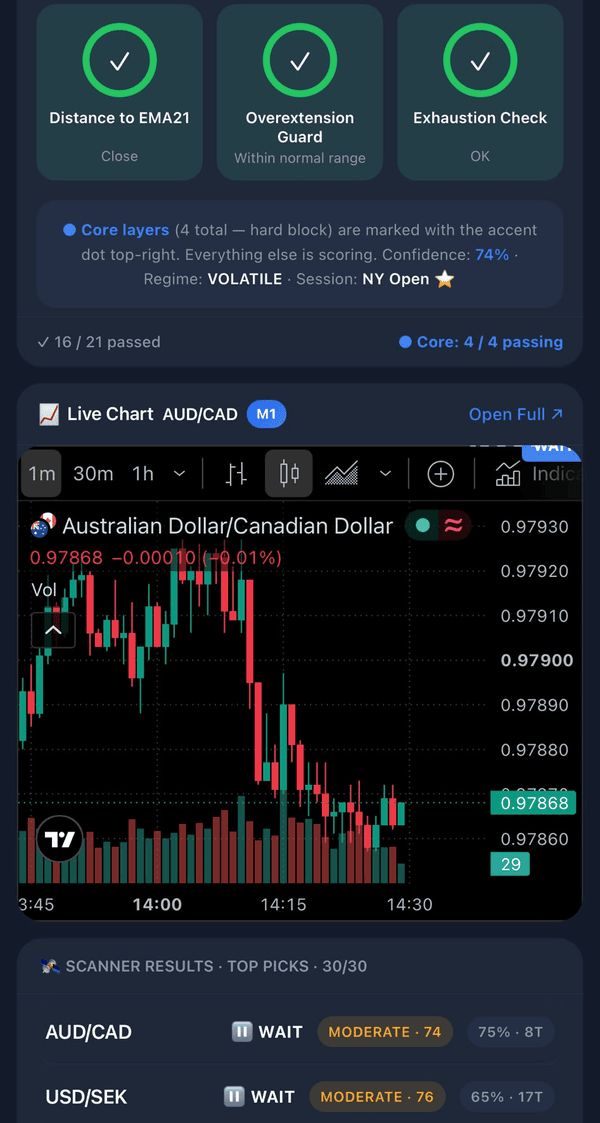
When the checks are done you get a clear read:
- Direction — CALL (up) or PUT (down), or WAIT when it isn’t clean.
- Confidence score — how many rules agree. It measures confluence, not your chance of winning.
- CORE status — e.g. "Core 4/4 passing". If CORE isn’t full, skip the trade.
- Live chart — confirm the picture yourself before you act.
- Backtest — a recent, conservative hit-rate for context.
How to use it — step by step
Create your Quotex account from our link
Register through our partner link so your Trader ID qualifies for bot access. Open Quotex sign-up.
Deposit from $30
Add at least $30 to your Quotex account so you can place real trades. The bot never touches your balance.
Open QT-Bot and enter your Trader ID
Use the web app or the Android APK and paste the Trader ID from your Quotex profile.
Run Auto Scan or Analyse Now
Let the 19 layers run and focus on the top-ranked pair.
Check CORE + confidence, then place the trade
Skip anything where a CORE layer fails. Confirm on the chart and place the trade yourself with a small, fixed stake.
Need the full access walkthrough? See How to use this bot for free access vs unlocking bot balance, deposits and WhatsApp verification.
Dashboard & packages
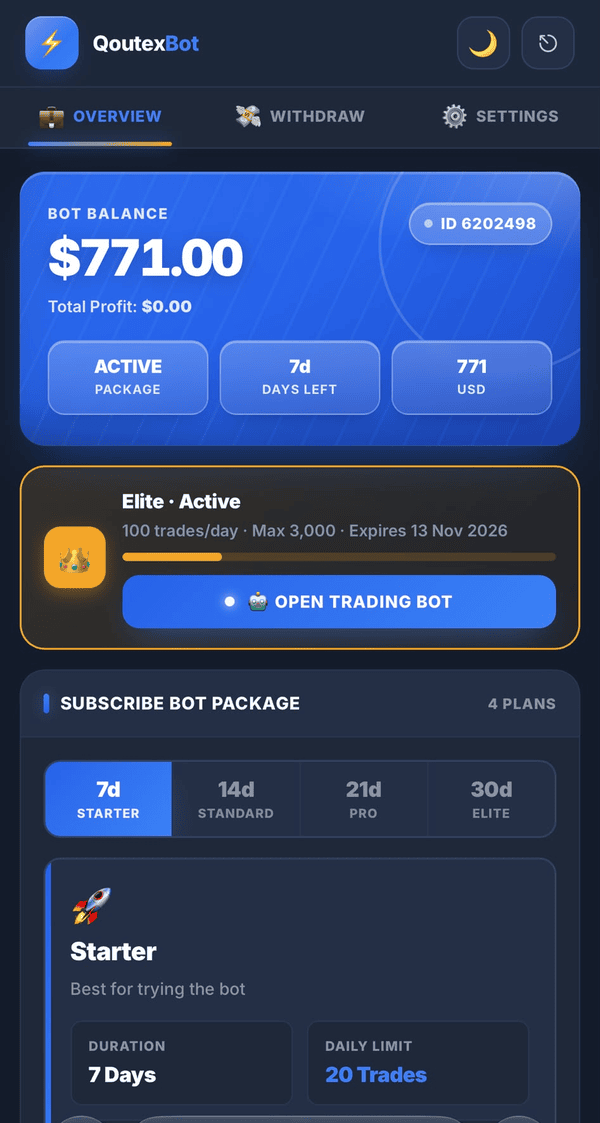
Inside the app your dashboard shows your bot balance, active package, days left and Trader ID, plus the Open Trading Bot button. Packages (Starter, Standard, Pro, Elite) set your daily trade limit and duration — pick one that matches how much you actually trade.
FAQ
How many checks does the Quotex bot run?
Up to 19 layers on every candle — 4 CORE hard-block checks (trend, higher timeframe, S/R room, market regime) plus scoring layers like ADX, MACD, RSI, Bollinger, ATR, divergence, session and exhaustion.
What are CORE layers?
CORE layers are hard blocks. If any CORE check fails, the bot returns WAIT regardless of the other signals. They’re marked with an accent dot in the app.
Does the confidence score mean my chance of winning?
No. It shows how many rules agree — confluence, not probability of profit. No signal guarantees a win.
Does the bot place trades automatically?
No. It analyses and explains each setup; you decide and place every trade yourself on Quotex. It never asks for your Quotex password.
What do I need to use it?
A Quotex account from our partner link with a Trader ID, plus the free web app or Android APK. Deposit from $30 to trade live.
Risk warning: Binary/digital options and Forex trading are high-risk and you can lose all the money you deposit. QT-Bot provides market analysis for education and decision support only — it is not financial advice and no signal or confidence score guarantees a profit. Quotex is not regulated by a top-tier regulator and is restricted in several countries; check the law where you live before trading. QT-Bot is an independent tool and is not owned by, affiliated with or endorsed by Quotex.